
问题描述
Anki是一种辅助记忆工具,Anki的官网上有很多很多的词库(Anki - friendly, intelligent flashcards)和插件(Anki - friendly, intelligent flashcards)可供选择,其中有哪一些词库和插件值得推荐使用?PS:词库可以包含各方面,不止限定在某一领域。
等过段时间(十一十二月吧)把Anki手册完全汉化后,就准备入Anki插件汉化的坑,主要是将有用有效的插件介绍都汉化共享给各位。注意,这将是一个远古巨坑,我一个人做肯定的是按N个月来算的,希望能有队友助力。
本回答不会有什么插件使用教程,就只是简单的根据个人使用经验或插件介绍即没用过,但是看起来很有用的插件向各位推荐。具体插件使用教程会在Anki插件汉化开坑之后逐渐发布,英文好的自己看吧。
-------------------------------------------------------------------------------------------------------------
- 常见的插件,勤思和弥乱已经都说了。所以我的回答会有和他们重复的地方。
- 一般是插件名+网址,英文好的可以上网站看看更多介绍,后面没有网站是因为我觉得很麻烦,自己复制名字去搜索吧。
- 数字排名只代表在本文中的顺序,无其他意思。
- 插件不评分,根据需要自己选择
- 想到哪我写到哪……
- 飞机票直达“插件地址”——https://ankiweb.net/shared/addons/
1 Right-hand reviews with jkl;

Anki默认左手空格+1234。使用该插件允许右手空格+jkl; 终于可以用我的右手撸Anki了!
2' Alternative hotkeys to cloze selected text in Add or Editor window
https://ankiweb.net/shared/info/2074653746
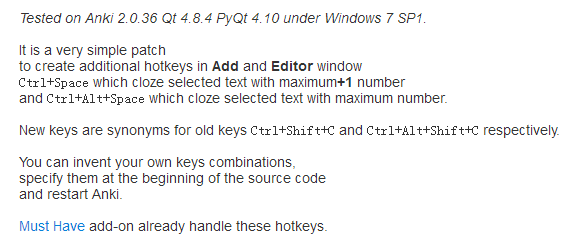
Anki默认快捷键普通方式无法更改,Anki默认填空方式C1型的快捷键很反人类,插件默认CTRL+SPACE是C123456型。Ctrl+Alt+Space是C1型,安装插件后可以更改成自己想要的快捷键。
3插件篇——Night Mode 夜间模式
https://zhuanlan.zhihu.com/p/21465775?refer=-anki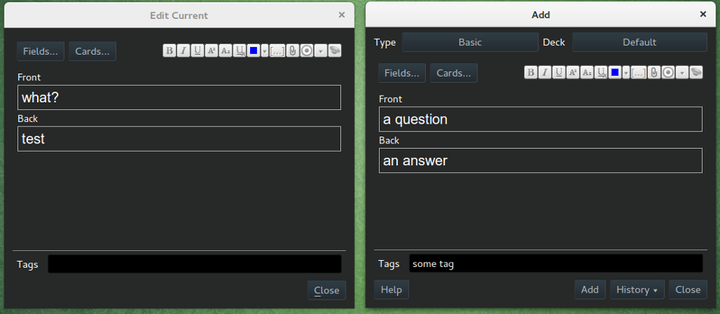
颜真卿用了夜间模式觉得很好,于是写了《劝学Anki诗》
三更灯火五更鸡,日日夜夜用Anki。
黑发不知Anki早,白首方悔用之迟。
4 Suggest Starting Ease for the deck's options group

小白福音,简单说就是你只需要看他建议的数值跑去改Starting Ease(开始简化)即可,这样可以相对贴切复习情况,让复习更有效率
5 True Retention
Adds a few new lines to the Statistics window, including True Retention (pass rate calculated only among "Review" cards) and a few placebo stats.
"True Retention" is a better indicator of learning quality than "Again" rate.
更真实的保留率,这个保留率涉及选项组Interval modifier(间隔修饰符),根据插件所显示的保留率去修改Interval modifier
On the SuperMemo website, they suggest that you can find an appropriate multiplier for a desired retention rate. Their formula boils down to:
log(desired retention%) / log(current retention%)Imagine we have a current retention rate of 85% and we want to increase it to 90%. We’d calculate the modifier as:
log(90%) / log(85%) = 0.65You can use Google to calculate it for you.
6 Quick note and deck buttons
https://ankiweb.net/shared/info/2181333594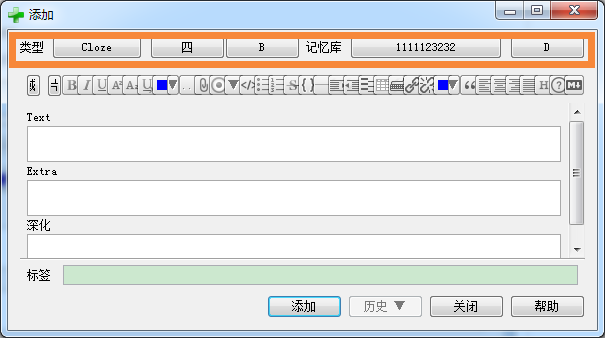
添加卡片时候可选择放置在哪个牌组,并选择什么模板。很有用
7和8 Zooming/Zoom
快捷调整字体大小,避免进入模板界面通过CSS调整。小白福音
重复造轮子结果惨遭车祸,实在痛心疾首,要是分别开发不同的插件该多好……
9 Multiple 'Add' windows

允许有多个“添加”界面。多P很刺激,小心忙不过来。
10 插件篇——Open Browser from the Add Window History menu
Original description: Adds a menu item into the "History" menu of the "Add" notes dialog that opens a Browser on the 'Added Today' view.
有时候在添加卡片的时候需要进入浏览器看一下,对比一下之类的,这时候再选择进入浏览器就有点慢,这个插件就可以帮你省下一点时间,让你更加方便。
11 12Image Occlusion Enhanced及其原初版本
很强的神器,主要作用就是在图片做覆盖,相当于做图片的填空题
https://zhuanlan.zhihu.com/p/21463061?refer=-anki这里有介绍。
13Basic Cloze
允许在BASIC模板使用CLOZE。
14American Says
American Says is an addon works in Editor window that get the pronunciation file url from merrian-webster of the selected word.
获取merrian-webster的发音
15 16 Quick Tagging/Tag Toggler
标签的插件有很多,这两个也不错。后者受到前者的启发进行改良,可谓威力加强版。
17 Power Format Pack: Markdown, code blocks, lists, tables, syntax highlight & more

更强大的编辑插件,原版的Anki编辑功能只能说和印象笔记差不多,有了这个插件就进化到ONENOTE或者为知笔记的编辑功能,很强。
18 19Colorful toolbars/Quick Colour Changing
顾名思义。做个色魔,想变黄就变黄
20Advanced Browser
让你的“浏览器”更高级
21 22 23 Ankiconnect/Yomichan for chrome/anki划词助手
这三者现在是超强神器,如果你正在学英语或者日语,但是还不知道的这东西的,请去下方链接了解,相信我,你不会失望。
英语插件? 有这一个就够了——工具篇【Anki划词制卡助手】
https://zhuanlan.zhihu.com/p/22472893?refer=-anki工具篇——日语学习大杀器一(Anki connect+Yomichan for Chrome)
https://zhuanlan.zhihu.com/p/21702356?refer=-anki24 懒癌毒发,止步于此。逼死强迫症,没有25(。・`ω´・)
26 Yomichan - Japanese text reader with built-in dictionary and fact creator
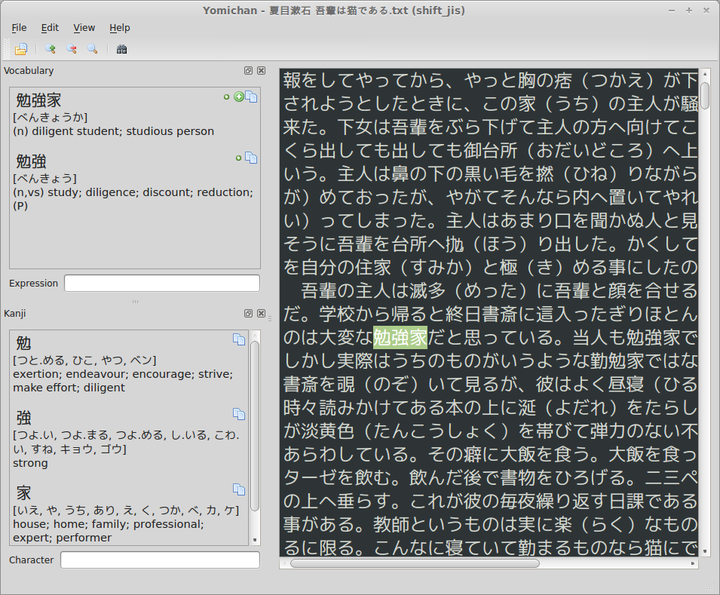
和Yomichan for chrome不同,这个YOMICHAN是用于本地的,也就是说只要你有个TXT就可以用了,具体和Yomichan for chrome一样,只要shift取词就可以极速显示释义并添加到Anki中,完美实现日语阅读,划词制卡。
27
OneNote importer
This addon can import `.mht` files exported from OneNote. It looks for a table and create a card for every row where the first column is the front side and the second is the back side. Html format and images in the table cells are supported.
没用过,似乎可以把onenote的导入到Anki,有待先烈出现
28
kind2anki - import words from Kindle Vocabulary Builder
之所以写这个是因为有更强的工具可以替代——超强力的EXCEL制卡工具
29
Blitz Speed Reading Trainer - force yourself to answer very quickly
The goal of this add-on is to force you to come up with the answer immediately in order to improve your speed-reading abilities in foreign languages.
Usage 1. Open Anki as usual and open a deck for learning show the first question.
2. Double-press `Space` or `Enter` as soon as you know the answer. Blitz will then file your answer accordingly:
– less than 2 second: -> Easy (if new card)/Normal (if reviewing the card)
– between 2 and 5 seconds -> Hard
– more than 5 seconds -> Again
很有趣的工具,意图让你更快反应单词对应意思。根据双击空格/enter的时间长短自动对卡片评级
30
Quick reschedule in reviewer
Allows the user to reschedule cards from within the review window.
This is useful, for example, when reviewing 'new' cards that were learned some time ago but still remembered. Cards that are recalled easily can be scheduled weeks or months ahead, avoiding unnecessary reviews.
By default, the 'r' key is used to reschedule reviews, which can be changed by editing the source file if you use this for something else.
Drop me an email for feedback / changes: addon_feedback at cerbs dot net.
复习时,R键快速对卡片排期规划。例如某些“新”卡片,你可以R键延长下次出现时期(Anki新卡片即便默认选择EASY,也是4天,在一段时间内你将见这张卡片很多次,这是用途之一)
31
Flip cards with shortcut key "0".
顾名思义,似乎是0键翻转卡片。没试过,有待先烈出现。